Effective Release Date: October 5, 2015
Release Notes:
- Reconciliation of all GL Accounts
- Reconciliation Report based on various GL Accounts
- Budget vs Actual to have the Total Column for Monthly, Quarterly and Yearly calculations
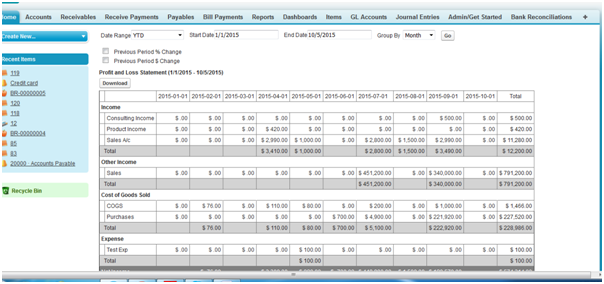
- P&L Report to have the Total Column
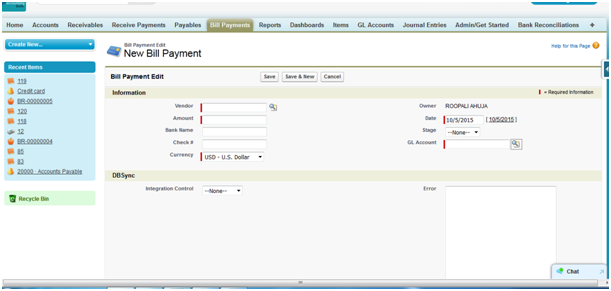
- Other Current Liability as an Account type added to the GL Account field under the Bill Payment Object
Reconciliation of all GL Accounts
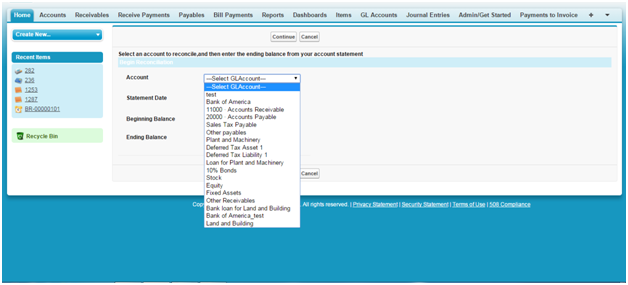
Now Reconciliation similar to Bank Reconciliation is available for all the GL Accounts under the following Account Types:
- Accounts Receivable
- Inventory
- Deferred Tax Asset
- Other Current Asset
- Investments
- Fixed Asset
- Accounts Payable
- Deferred Tax Liability
- Other Current Liability
- Long Term Liability
- Equity
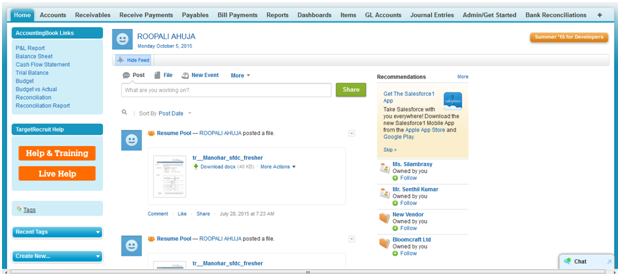
Click on Reconciliation in the AccountingBook Links in the home page
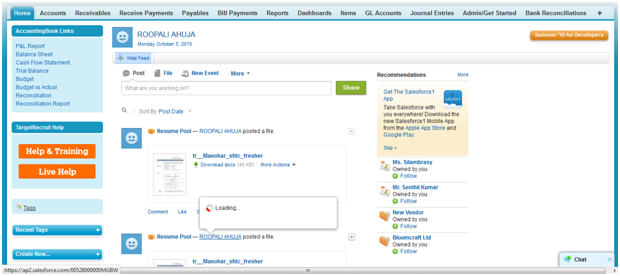
Now you can select all the GL Accounts based on the Account types mentioned above from the Account drop down.
How to do Bank Reconciliation in AccountingBook is already described in Bank Reconciliation Follow the same steps to do Reconciliation of various GL Accounts.
Reconciliation Report based on various GL Accounts
Now based on the Reconciliation done, Reconciliation Report for all GL Accounts is also available.
Click on the Reconciliation Report in the AccountingBook links in the home page and follow the same steps as described under Bank Reconciliation Report
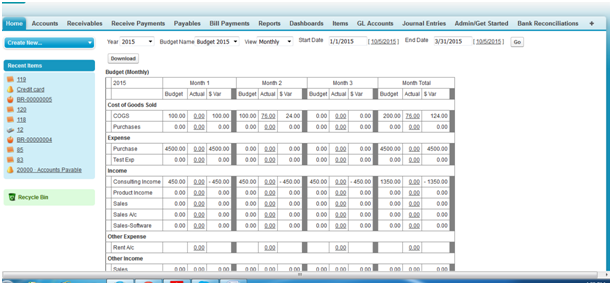
Budget vs Actual to have the Total Column for Monthly, Quarterly and Yearly calculations
Now, in Budget vs Actual, we have provided start date and end date to enable the users to get the monthly and quarterly variances based on the date range selected. Also, Total column has been added which will sum up all the values based on the period (start date and ens date) selected by the user. These features are in addition to the already available Budget Vs Actual report.
P&L Report to have the Total Column
Total column has been added to P&L Report which will sum up all the values based on the period (start date and ens date) selected by the user.
Other Current Liability as an Account type added to the GL Account field under the Bill Payment Object
While making the payment through Bill Payment Object, the only option available was to select Bank Account type from the GL Account Lookup. Now Other Current Liability as an Account type has been added to allow the users to select the correct Account type in case the payment has been made through Credit Card.
Create GL Account as Credit Card under Account Type as Other Current Liability and this will be available for selection under the GL Account field in Bill Payment Object.
Attachments:
 image2015-10-5 15:57:32.png (image/png)
image2015-10-5 16:6:18.png (image/png)
image2015-10-5 16:20:33.png (image/png)
image2015-10-5 16:39:9.png (image/png)
image2015-10-5 16:50:8.png (image/png)
image2015-10-5 17:36:21.png (image/png)
image2015-10-5 15:57:32.png (image/png)
image2015-10-5 16:6:18.png (image/png)
image2015-10-5 16:20:33.png (image/png)
image2015-10-5 16:39:9.png (image/png)
image2015-10-5 16:50:8.png (image/png)
image2015-10-5 17:36:21.png (image/png)