A process is a collection of workflows that makes integration work. Any process can be scheduled to run at regular intervals.
The process listing page has download functionality. A user can download a whole set of processes - i.e download project in a zipped format to the local file system.
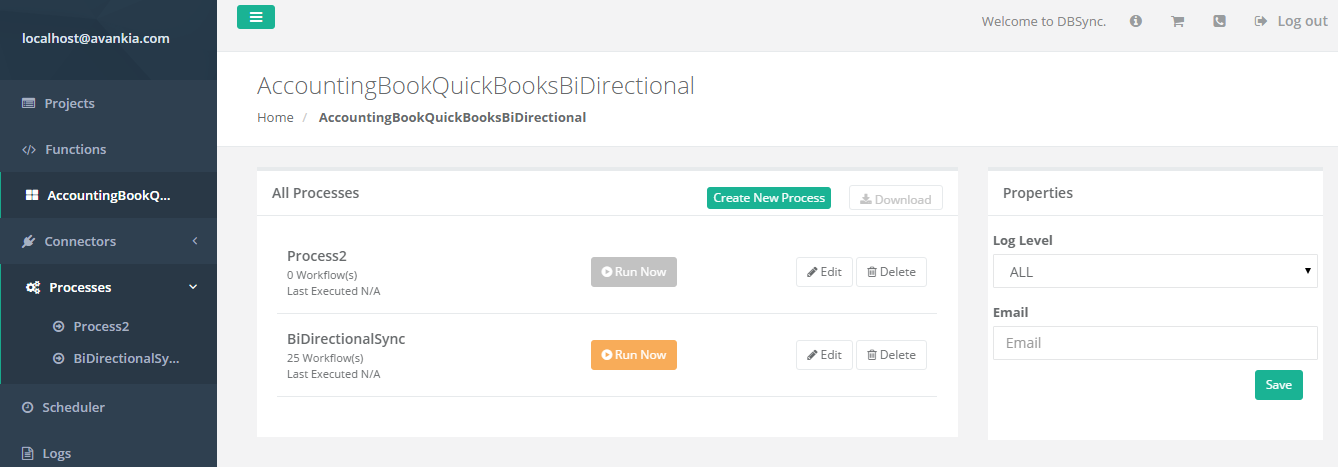
The below screenshot illustrates a process listing from where a single process can run. DBSync allows processes to run concurrently.
Create, Update and Delete Process
To create a new Process- "Create New Process" -
A user can navigate to process listing in two ways - either by clicking on the process name from the menu available in the navigation or by clicking on any particular project.#.
- Enter a preferred name and "Save" to view the process on the listing page.
- "Edit"- To edit/change the process name.
- "Delete"- To Delete the process and all of its components from the system. Once deleted, a user will not be able to recover process, or any of its components, from the system.
- "Download"- Download the process in a zipped format in the Downloads folder of the local file system.