Issue: Amount value from Salesforce is not getting pushed to QuickBooks because of decimal places exceeding more than two values.
Reason: QuickBooks does not support amount values more than two decimal places. Thus Invoices can not be created through Sync due to amount value exceeding two decimal places.
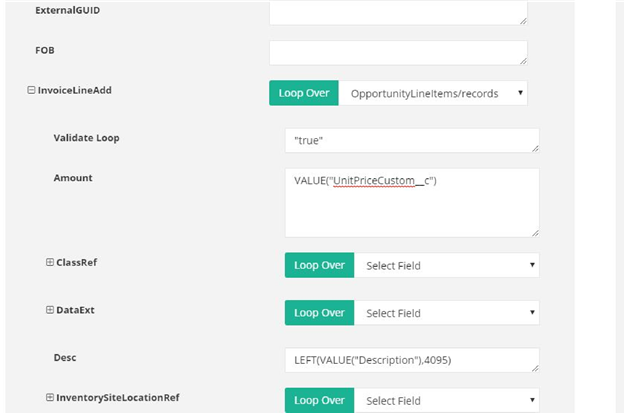
Fig 1: Amount field Mapping
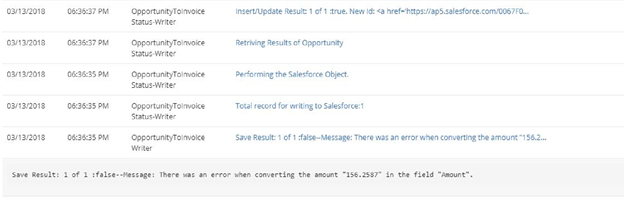
Fig 2: Logs
Solution:
- Open the Workflow that needs to be updated.
- Update the Amount field by LSPLIT(VALUE("UnitPriceCustom__c"),".")+"."+RIGHT(RSPLIT(VALUE("TotalPrice"),"."),2).
- Save and close the Workflow.
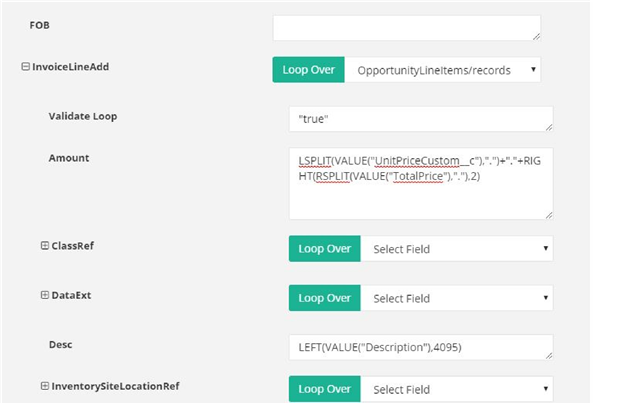
Fig 3: Updated mappings
4. Run the sync.
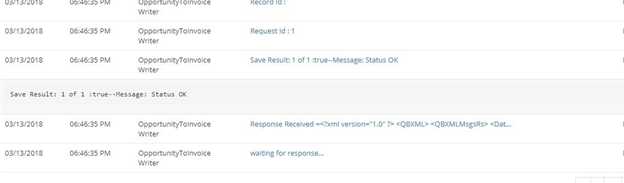
Fig 4: Logs of success
Attachments:
 image2018-4-6_1-55-41.png (image/png)
image2018-4-6_1-56-25.png (image/png)
image2018-4-6_1-57-30.png (image/png)
image2018-4-6_1-58-1.png (image/png)
image2018-4-6_1-55-41.png (image/png)
image2018-4-6_1-56-25.png (image/png)
image2018-4-6_1-57-30.png (image/png)
image2018-4-6_1-58-1.png (image/png)